Recipe Keeper and Paprika solve the same basic problem: turn scattered recipes into a cookbook you can search, plan from, and cook with. Their priorities are different. Paprika is a mature power-user tool with excellent desktop apps and kitchen controls. Recipe Keeper is particularly strong at scanning paper recipes and producing printable family cookbooks.
Recipe Scout takes a newer, mobile-first route. It is designed for recipes arriving from websites, Instagram, TikTok, YouTube, photos, and handwritten cards, then connects them to collaborative collections, meal plans, grocery lists, focused cooking, and recipe-aware help.
We make Recipe Scout, so this comparison has an obvious point of view. We have linked the competing products' official documentation, named the areas where they are the better fit, and avoided pretending that one app wins for every cook. Features and U.S. pricing were checked on September 23, 2026.
The short answer
- Choose Paprika if you want established Mac and Windows apps, a pantry, reusable menus, detailed manual controls, and a one-time purchase on each platform.
- Choose Recipe Keeper if scanning cookbooks, photos, PDFs, and handwritten cards is central to the project, or if you want to design and print a family cookbook.
- Choose Recipe Scout if recipes come from a mix of social posts, websites, photos, and paper, and you want a mobile workflow that continues through shared collections, planning, shopping, and cooking.
Recipe Keeper vs Paprika vs Recipe Scout at a glance
| Paprika 3 | Recipe Keeper | Recipe Scout | |
|---|---|---|---|
| Best fit | Traditional recipe power users | Family archives and printable cookbooks | Mobile discovery-to-dinner workflow |
| Platforms | iPhone, iPad, Android, Mac, Windows | iPhone, iPad, Android, Mac, Windows | iPhone, iPad, Android |
| Web recipe import | Yes | Yes | Yes |
| Social recipe import | Paprika 4 beta | Instagram and TikTok are documented | Instagram, TikTok, and YouTube |
| Photo or paper scanning | Paprika 4 beta | Photos, PDFs, cookbooks, and handwriting | Camera, gallery images, PDFs, handwriting, and pasted text |
| Organization | Categories and subcategories | Courses, categories, ratings, and favorites | Search, tags, favorites, likes/dislikes, and collections |
| Meal planning | Daily, weekly, monthly, and reusable menus | Weekly and monthly | Weekly planning plus optional AI-assisted planning |
| Grocery tools | Ingredient merging, aisles, multiple lists, and pantry | Aisles, multiple lists, and plan-to-list | Merged ingredients, aisle grouping, plan-to-list, and real-time sharing |
| Cooking tools | Scaling, conversion, timers, ingredient crossing, step highlighting | Scaling and Alexa step guidance | Scaling, conversion, multiple timers, pinned recipes, and step-by-step mode |
| Collaboration | Email in Paprika 3; family accounts and shared cookbooks in Paprika 4 beta | Email, social sharing, and shared meal plans | Shared lists and collections with viewer/editor roles |
| Payment model | One-time purchase sold separately by platform; Paprika 4 beta says selected new features will require a subscription | Free download with a Pro upgrade sold by platform | Free to start; optional monthly or annual Plus subscription |
This is a documented feature comparison, not a claim that every importer was tested against the same sites or every OCR system against the same handwriting.
An important Paprika 3 versus Paprika 4 distinction
Paprika's broadly available product is Paprika 3. Its official feature list centers on website importing, categories, pantry tracking, meal planning, grocery lists, scaling, conversions, timers, and offline access. Those are mature, useful tools.
Paprika announced a Paprika 4 beta in July 2026 with social-media importing, recipe-photo scanning, family accounts, direct messaging, shared cookbooks, barcode scanning, and Alexa integration. The company says those new features are available during beta and will later require a premium subscription.
That means a fair comparison should not describe every Paprika 4 beta feature as part of the standard Paprika 3 purchase. If Instagram importing, scanning, or household accounts determine your choice, verify which version is available to you and what it costs before moving a large cookbook.
Which app saves recipes from the places you use?
Paprika: strongest for conventional recipe websites
Paprika's built-in browser downloads structured recipes from supported websites. When a page cannot be parsed cleanly, its clipboard tools let you copy individual fields manually. A bookmarklet can send recipes from a desktop browser into Paprika Cloud Sync.
That workflow is proven and direct for people who mostly save traditional food-blog pages. Social importing and photo scanning are part of the Paprika 4 beta rather than the standard Paprika 3 feature set at the time of writing.
Recipe Keeper: strongest for paper archives and PDFs
Recipe Keeper's official site documents imports from websites, Instagram, and TikTok, plus OCR scanning from a phone camera, existing photos, and PDF files. This is a practical mix for a collection split between the web and a box of family recipes.
Its archive orientation continues after import: Recipe Keeper can create customized cookbooks with a cover, chapters, contents, page numbers, and layouts for printing or PDF sharing. Neither Paprika nor Recipe Scout makes printed cookbook production as central to the product.
Recipe Scout: broadest mobile capture workflow
Recipe Scout accepts a website link; an Instagram, TikTok, or YouTube link; a photo or document scan; an existing gallery image or PDF; and pasted recipe text. It preserves source attribution and turns the result into editable ingredients and instructions.
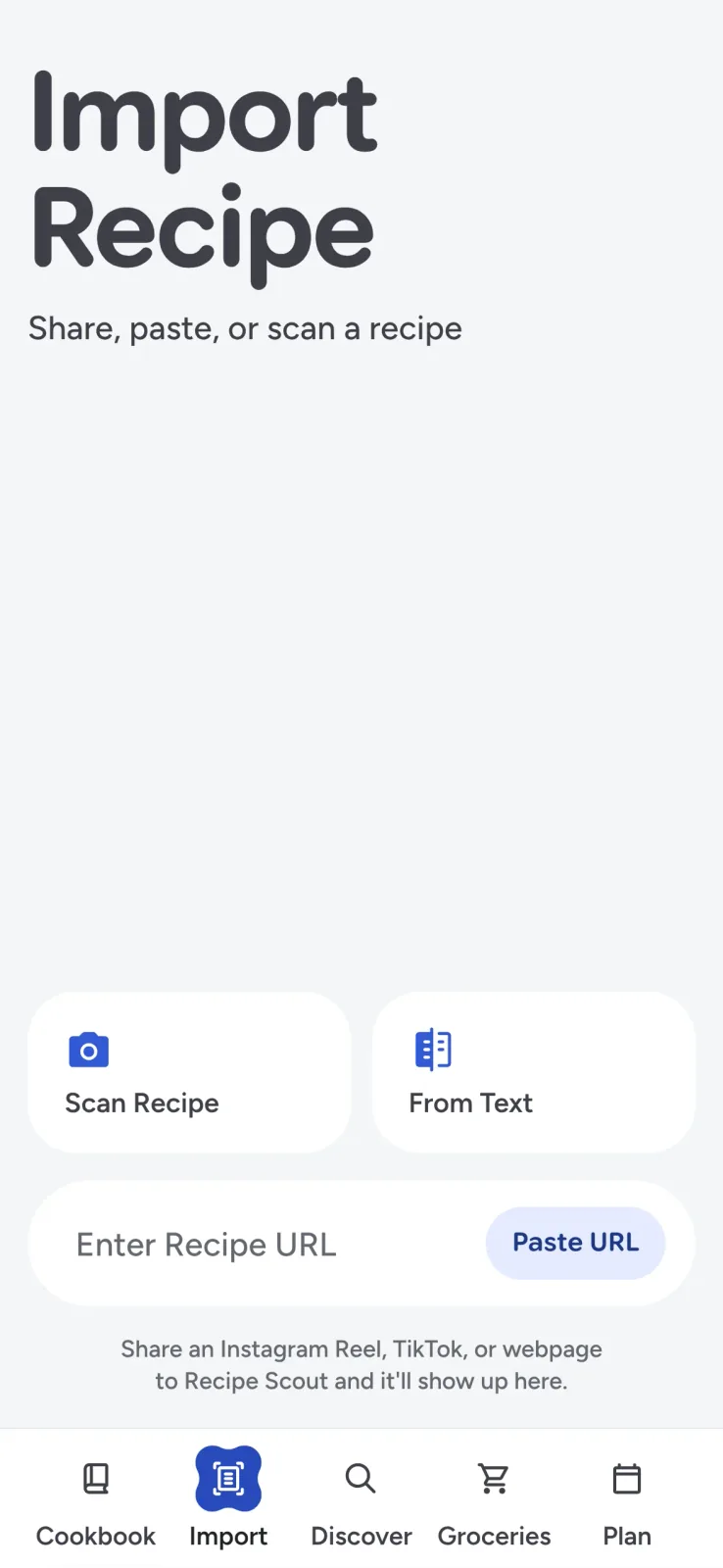
This breadth matters when “my recipes” actually means browser tabs, saved videos, screenshots, text messages, and handwritten cards. See the full workflows for saving recipes from websites and social apps and digitizing handwritten recipes.
Whatever app you choose, review imported fractions, temperatures, yields, and teaspoon-versus-tablespoon abbreviations before cooking. OCR and automated extraction reduce typing; they do not remove the need for judgment.
Organizing and finding recipes
Paprika has the deepest traditional filing system of the three. Recipes can live in categories and nested subcategories, and search can use names, ingredients, sources, and other fields. It suits someone who enjoys maintaining a carefully structured database.
Recipe Keeper uses courses and categories, with ratings, favorites, ingredient search, and direction search. The model is approachable for a family collection and makes it easy to browse without designing an elaborate taxonomy first.
Recipe Scout combines full-cookbook search with tags, favorites, likes and dislikes, recent activity, and custom collections. Collections can be private or collaborative. Viewer and editor roles make it possible to build a shared “weeknight dinners” or “family recipes” collection without sharing an account password.
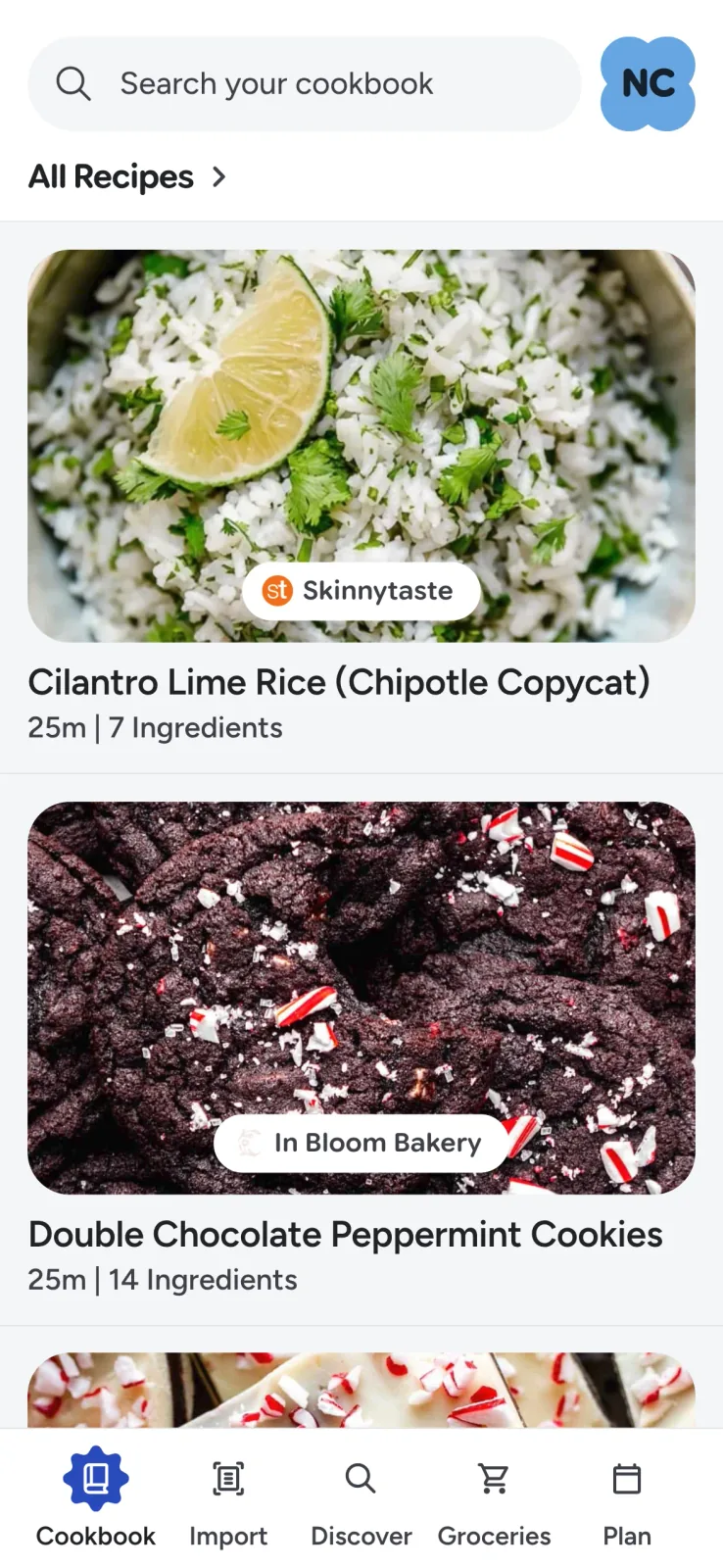
Paprika is the better fit for nested personal categories. Recipe Scout is the better fit for small, purpose-driven collections that several people can curate together. Recipe Keeper sits between them with straightforward household organization.
Meal planning and grocery lists
All three apps connect recipes to planning and shopping, but the emphasis differs.
Paprika supports daily, weekly, and monthly planning, plus reusable menus. Its grocery list combines similar ingredients, sorts them by aisle, supports multiple lists, and connects to a pantry that tracks quantities and dates. If you want a manual command center and will maintain the pantry data, Paprika is the strongest option.
Recipe Keeper offers weekly and monthly planning. It can add ingredients from a plan to a shopping list, group items by aisle, keep separate store lists, and share a meal plan with family. It covers the conventional plan-and-shop loop without asking you to learn a dense system.
Recipe Scout plans breakfast, lunch, dinner, and snacks by week. A plan can become a merged, aisle-organized grocery list, and household members can update a shared list in real time. Recipe Scout Plus can also draft a week from your own cookbook and preferences. The goal is fewer transitions between “what should we make?” and “what do we need to buy?”
For a practical method independent of any app, read how to make a weekly meal plan you will actually follow and how to combine several recipes into one grocery list.
Which app is best while you cook?
Paprika remains excellent at the stove. It can keep the screen awake, cross off ingredients, highlight the current direction, scale servings, convert measurements, detect times in instructions, and start timers. Multiple recipes can be pinned for switching between dishes.
Recipe Keeper recalculates ingredient quantities when servings change and offers step-by-step, hands-free guidance through its Amazon Alexa skill in English. Its cooking experience is simpler than Paprika's dense toolkit, which may be an advantage for someone who mostly wants a clean recipe view.
Recipe Scout offers a conventional ingredient-and-instruction view plus a focused mode that isolates one step at a time, enlarges it, and surfaces the ingredients relevant to that step. Measurements and times are interactive, several timers can run together, the screen stays awake, and pinned recipe tabs retain the cook's place across dishes.
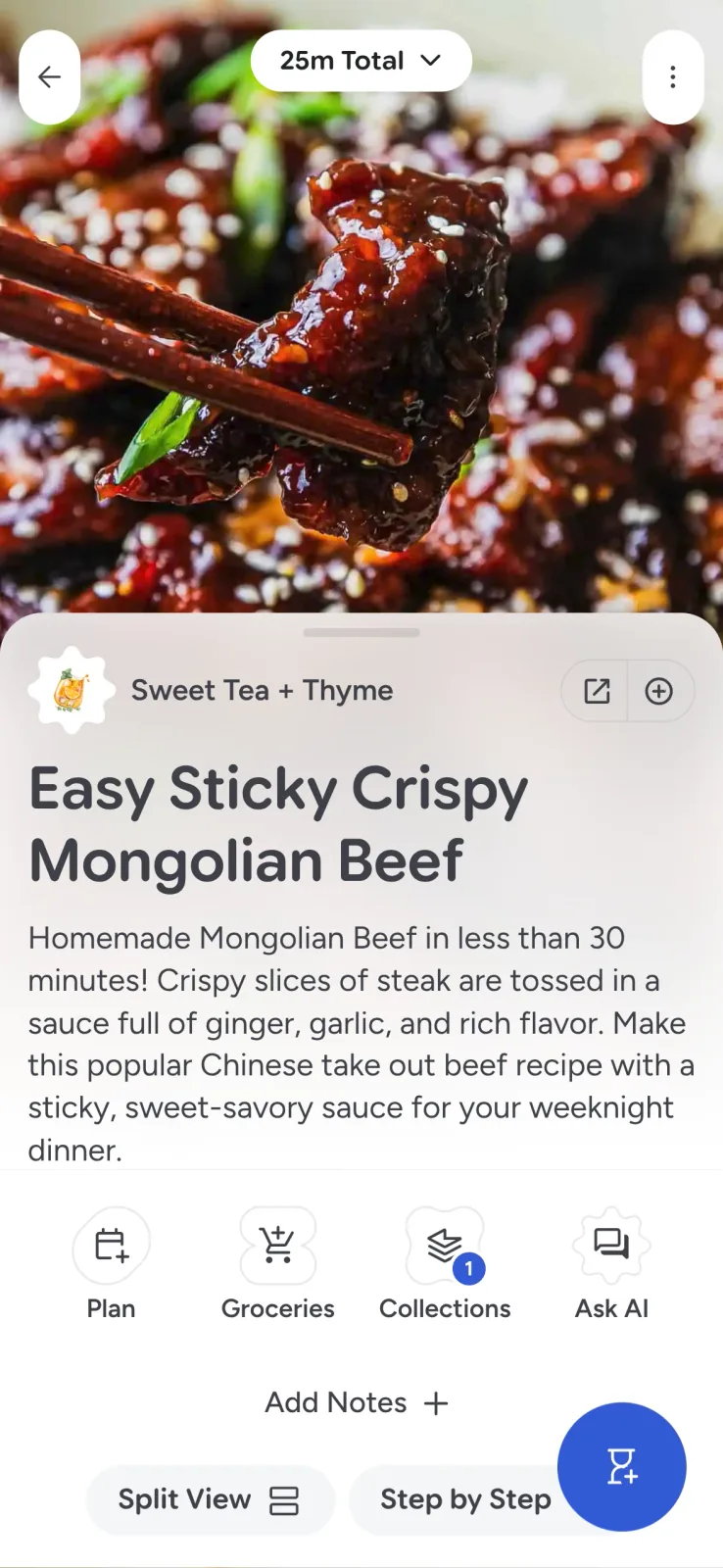
Recipe Scout also keeps recipe-aware help beside the dish. You can ask about a substitution, technique, timing, or food-safety question without pasting the whole recipe into a separate chat. Treat any AI-assisted edit as a draft, and use authoritative guidance for food safety.
Choose Paprika for mature manual controls. Choose Recipe Scout for focused steps, multiple active dishes, and contextual help. Choose Recipe Keeper if a clean view and Alexa guidance cover what you need.
Desktop access, offline use, and sync
Paprika and Recipe Keeper both offer native Mac and Windows applications. That matters when importing a large existing library, editing long notes, printing, or maintaining a cookbook at a desk.
Paprika stores data locally for offline use and includes Paprika Cloud Sync with purchased full versions. Its official documentation also provides exports as HTML and in Paprika's own recipe format, giving careful users a clear backup path.
Recipe Keeper syncs recipes, shopping lists, and meal plans across its supported phone, tablet, PC, and Mac apps and says recipes remain available offline. Its printed and PDF cookbooks are especially useful for presentation and family sharing.
Recipe Scout is centered on iOS and Android rather than native desktop cookbook software. Its cookbook is cached for offline access and synced between supported devices. That is a good fit when importing happens from a phone share sheet and cooking happens from a phone or tablet; it is not the best fit for someone who wants a full Windows editing application.
Sharing without sharing a password
Paprika 3 can share recipes by email, including a format other Paprika users can import. Paprika 4 beta adds family accounts, direct messaging, and shared cookbooks, but those features should be evaluated as beta features until their final release and pricing are clear.
Recipe Keeper can share recipes by email or social channels, create a printable or PDF cookbook, and share meal plans. Its website describes broad sharing, but households should still test the exact account and editing behavior they expect before purchasing the app on several platforms.
Recipe Scout supports live shared grocery lists and collaborative collections. A collection owner can invite people by username, link, or QR code and assign viewer or editor permissions. This makes it the clearest choice of the three when separate accounts need to maintain one collection together today.
What do the apps cost?
Prices vary by platform and region, so check the store on every device you plan to use.
- Paprika: The U.S. App Store lists Paprika 3 for iPhone and iPad at $4.99. The Mac App Store and Paprika's Windows page list $29.99 each. Paprika states that each platform is sold separately. Android offers a 50-recipe free version with an in-app full upgrade. Paprika 4's beta announcement says selected new features will later require a premium subscription.
- Recipe Keeper: The app is free to download with a limited trial or tier. The U.S. App Store lists the iPhone and iPad Pro upgrade at $19.99. Recipe Keeper's Google Play documentation says devices on other platforms require separate purchases, so verify the cost for every platform in your household.
- Recipe Scout: Recipe Scout is free to start. The U.S. App Store currently lists Plus at $3.49 monthly or $29.99 annually. Core cookbook and cooking workflows are available without beginning by purchasing separate desktop editions.
A one-time purchase is not automatically cheaper, and a subscription is not automatically better. Compare the devices your household actually uses and the features that sit behind each upgrade. Then test a few difficult recipes before moving hundreds.
Choose Paprika if...
- You maintain recipes on a Mac or Windows PC.
- Most recipes come from conventional websites.
- A pantry, reusable menus, nested categories, and extensive manual controls appeal to you.
- You prefer one-time purchases and understand that each platform is sold separately.
- You want a documented HTML backup of the collection.
Paprika is the safest recommendation for an experienced solo cook who wants dependable desktop software and does not mind maintaining a detailed system.
Choose Recipe Keeper if...
- You are digitizing cookbooks, magazines, PDFs, or handwritten family cards.
- Printing a polished family cookbook is part of the goal.
- You want native mobile and desktop apps with a straightforward interface.
- Alexa guidance matters in your kitchen.
- Social sharing is more important than granular collaborative roles.
Recipe Keeper is the strongest archive project of the three. It treats the printed cookbook as an outcome, not only a source to be scanned.
Choose Recipe Scout if...
- Recipes arrive from Instagram, TikTok, YouTube, websites, screenshots, photos, and paper.
- You want separate household accounts to collaborate on collections and shopping lists.
- Focused step-by-step cooking, several timers, and recipe-aware help matter more than desktop software.
- You want saved recipes to continue directly into a meal plan and one merged grocery list.
- You prefer to test the core mobile workflow for free before deciding whether the optional Plus tools are useful.
Recipe Scout is the strongest fit for a phone-first household whose problem is not only storing recipes, but getting from a scattered idea to a meal on the table.
Test five recipes before moving your whole cookbook
Do not choose from a comparison table alone. Try the sources and situations that are hardest in your kitchen:
- Import a normal recipe page.
- Import a social video you genuinely want to cook.
- Scan a faded or handwritten card and inspect every fraction.
- Plan two meals and combine their ingredients into a grocery list.
- Cook one multi-step recipe and test scaling, timers, screen behavior, and offline access.
Also confirm export, cancellation, and account-sharing behavior before committing a large archive. The best recipe organizer is the one that handles your awkward sources and remains comfortable after the novelty of importing wears off.
If that test sounds like your workflow, try Recipe Scout with five real recipes. Keep it only if it makes the path from discovery through cooking noticeably easier.


