
The best recipe organizer is not the app with the longest feature list. It is the one that fits where your recipes come from, which devices you cook with, and whether you want a simple cookbook or a full planning system.
We compared six well-known options: Recipe Scout, Paprika, Recipe Keeper, ReciMe, Samsung Food, and Crouton. Each has a credible reason to choose it. The short answer is below; the rest of this guide explains the tradeoffs.
The quick comparison
| App | Best for | Platforms | Standout strengths | Payment model |
|---|---|---|---|---|
| Recipe Scout | Moving saved recipes from discovery through cooking | iPhone, iPad, Android | Web and social importing, photo/text capture, search, planning, grocery lists, focused cooking mode, contextual AI help | Free tier and optional Plus subscription |
| Paprika | Established power users who prefer a traditional recipe manager | iPhone, iPad, Android, Mac, Windows | Strong web importer, menus, scaling, pantry-aware lists, timers, mature desktop apps | One-time purchase sold separately by platform |
| Recipe Keeper | Scanning family recipes and printing or sharing cookbooks | iPhone, iPad, Android, Mac, Windows | OCR scanning, PDF/photo imports, meal planning, shopping lists, cookbook printing | Free trial/tier with an upgrade; check current store terms |
| ReciMe | Frequent social-media imports and shared cookbooks | iPhone, iPad, Android, web | Instagram and TikTok importing, collaboration, nutrition, grocery lists, meal plans | Free tier with weekly import limits; subscription for unlimited and premium tools |
| Samsung Food | Free recipe discovery and a broad web community | iPhone, iPad, Android, web | Discovery, browser saving, communities, recipe box, lists, nutrition | Free core app; Food+ subscription for selected planning and nutrition features |
| Crouton | People deep in the Apple ecosystem | iPhone, iPad, Mac, Apple Watch, Vision Pro | Apple integrations, hands-free cooking, scanning, timers, meal planning | Free download with in-app purchases |
This is a documented feature comparison, not a lab test. We did not assign invented speed scores or pretend every importer was tested against the same set of sites.
What makes a good recipe storage app?
A recipe storage app should do more than hold a title and a link. The strongest options turn recipes from websites, social posts, photos, PDFs, and handwritten cards into structured records that you can search and edit. They also preserve the original source, so you can credit the creator and revisit context that was not captured in the recipe card.
Before choosing an app, test the sources you actually use. Someone saving mostly food-blog recipes needs a reliable web importer; someone preserving a family archive needs scanning and careful editing; someone collecting Instagram or TikTok ideas needs supported social importing. Our guides explain how to save recipes from websites and social apps and how to digitize handwritten recipes without losing the original.
Organization matters after import. Look for full-text search, collections or tags, favorites, and a clear way to separate untested recipes from dependable meals. A practical structure is more valuable than dozens of overlapping folders; see how to organize recipes into collections you will use.
Free recipe organizer apps versus paid options
Free plans are useful for testing import quality, search, and everyday cooking. Their limits usually appear around import volume, device syncing, nutrition, collaboration, or advanced planning. A paid app may be worthwhile if it replaces several disconnected tools, but only after you have tested your hardest recipes and confirmed how export works.
Do not compare prices without comparing platforms. Paprika is purchased separately on each supported platform. Other products use subscriptions or a free tier with optional upgrades. Pricing and plan details change, so verify the current store listing before committing a large collection.
Recipe organizer software for PC, Mac, and mobile
If you want full recipe organizer software on a computer, Paprika and Recipe Keeper offer native Windows and Mac apps. Crouton is designed around Apple devices, including the Mac. Samsung Food includes web access, while Recipe Scout and ReciMe center their experience on mobile workflows.
Desktop access is most important for bulk editing, long notes, printing, or managing a large archive. Mobile access matters more while shopping, importing from social apps, and cooking. Choose based on where you will maintain the collection—not only where you first discover recipes.
Best overall workflow: Recipe Scout
Recipe Scout is the strongest fit when recipes arrive from many places and you want them to remain useful after saving. It imports from conventional recipe pages, supported social posts, photos, handwritten cards, PDFs, and pasted text. A saved recipe can then move into a collection, meal plan, merged grocery list, or focused cooking view.
The main advantage is continuity. You can discover a dish, preserve its source, scale it, shop for it, run its timers, and ask a recipe-aware assistant about a substitution without rebuilding the context in separate apps.
Recipe Scout is also ad-free. Its tradeoff is that it currently focuses on iOS and Android rather than offering full desktop cookbook apps. People who do most of their recipe editing on a Mac or Windows computer may prefer Paprika or Recipe Keeper.
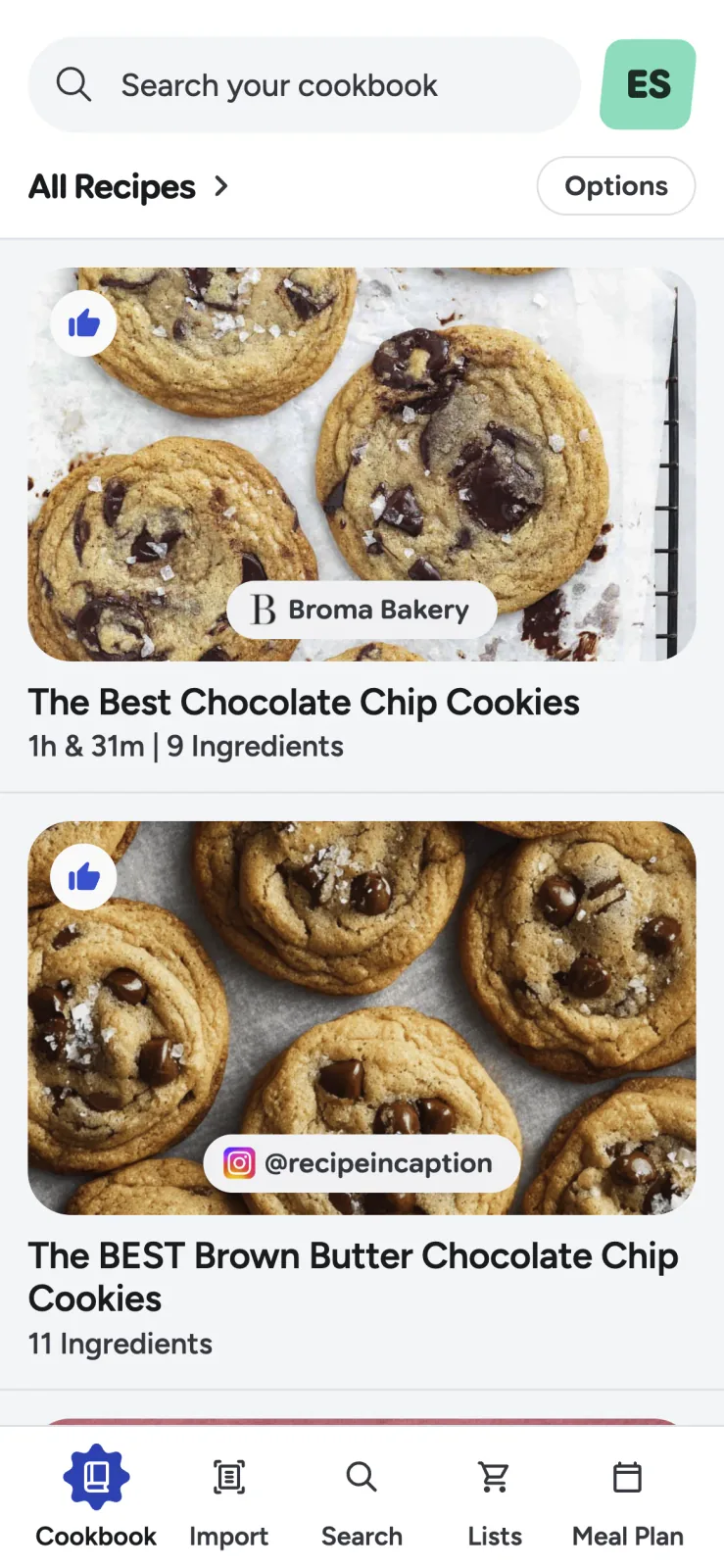
Choose Recipe Scout if you want a modern mobile workflow from social or web discovery to planning and cooking. Start with how to save a recipe from a website or social app or how to digitize handwritten recipe cards.
Best traditional power-user option: Paprika
Paprika is a mature recipe manager with native apps for iOS, Android, Mac, and Windows. Its built-in browser can capture recipes from the web, and its toolkit includes grocery-list aisle sorting, ingredient consolidation, serving scaling, timers, menus, and weekly or monthly meal planning.
Paprika is particularly appealing if you want desktop apps and prefer buying software outright. The important catch is that each platform is sold separately, although Paprika Cloud Sync is included for connecting the versions you own.
Choose Paprika if you primarily save conventional web recipes, want a dense set of manual controls, and value desktop access more than social-post importing. Its official site and help guide include current interface screenshots.
Best for family archives and printed cookbooks: Recipe Keeper
Recipe Keeper is especially capable when the collection begins on paper. Its official documentation describes imports from websites, photos, PDFs, cookbooks, and handwritten recipes, plus sync across iPhone, iPad, Android, Windows, and Mac.
It also supports meal planning, shopping lists, recipe sharing, and cookbook printing. That combination makes it a good choice for a family project in which one person scans the box of cards, several relatives access the collection, and a printed book is part of the goal.
OCR is never perfect, especially with faded ink or family shorthand. Whatever app you choose, check fractions, temperatures, and teaspoon-versus-tablespoon abbreviations before cooking. Recipe Keeper’s official product page shows its scanning and cookbook screens.
Best for social imports and collaboration: ReciMe
ReciMe is built around saving recipes from social platforms such as Instagram and TikTok, then using them in cookbooks, meal plans, and grocery lists. It also supports recipe sharing and collaborative cookbooks, which is useful for couples, roommates, or a group assembling family recipes.
The free plan includes core organization and planning tools but currently limits the number of weekly imports. ReciMe Plus adds unlimited imports and premium features such as nutrition, conversion, guided cooking, and broader scanning tools, according to its current plan guide.
Choose ReciMe if most of your recipe inspiration lives in short-form video and collaboration matters more than desktop-native software. Its official help center contains product images and current feature descriptions.
Best free discovery ecosystem: Samsung Food
Samsung Food combines a recipe box with discovery, communities, shopping lists, nutrition information, and web access. Recipes can be saved through mobile sharing, a browser extension, or a copied link, then organized into collections.
Its community and discovery features make it a better fit for someone who wants inspiration inside the same service, not only private storage. Some advanced meal-planning functions are part of Food+, and feature availability differs between the mobile and web versions; Samsung documents those differences in its meal planner guide.
Choose Samsung Food if a large free ecosystem, web access, and public recipe discovery are priorities. The official recipe-box page includes current screenshots.
Best Apple-native experience: Crouton
Crouton is designed for Apple devices, with apps for iPhone, iPad, Mac, Apple Watch, and Vision Pro. It supports web imports, recipe scanning, iCloud sync, scaling, conversions, timers, grocery lists, and meal planning. Its Apple integrations and hands-free cooking controls distinguish it from cross-platform competitors.
The limitation is equally clear: it is not an Android option. Choose Crouton if your household uses Apple devices and platform-native touches matter more than cross-platform reach.
Crouton provides an official press kit with product screenshots, while its App Store listing shows the current interface and in-app purchases.
How to choose without moving your whole cookbook twice
Test the part of the workflow that is hardest for you. Do not begin by importing 500 recipes.
- Choose five awkward sources. Include a normal website, a social post, a photo, a family card, and pasted text if those reflect your collection.
- Correct one imported recipe. Notice whether editing quantities, steps, and notes feels natural.
- Find it again. Search by title, ingredient, collection, or whatever you normally remember.
- Plan and shop once. Add two recipes to a plan and list. Check whether duplicates and serving sizes remain understandable.
- Cook one multi-step dish. Evaluate readability, screen behavior, timers, and scaling in the kitchen.
- Check portability. Confirm supported devices, export options, offline behavior, and what happens if you stop paying.
The last point is easy to ignore. Your recipe collection may outlive your current phone, so data access and export matter as much as a polished home screen.
Which recipe organizer should you pick?
Choose Paprika for mature desktop apps and a traditional one-time-purchase model. Choose Recipe Keeper for heavy scanning and printed family cookbooks. Choose ReciMe for social imports and collaboration. Choose Samsung Food for a free discovery ecosystem. Choose Crouton for an Apple-first experience.
Choose Recipe Scout when you want the shortest path from a scattered recipe to an organized, shoppable, cookable plan on iOS or Android. Try Recipe Scout with five recipes first, then keep it only if it makes the full workflow easier.


